
Leave requests from the kiosk or their phone, approved from yours.
Staff ask for leave where they already clock in. You approve from one queue, see who is away on a calendar that marks NZ public holidays, and send approved leave to your payroll. Included in the $29 a month NZD plan, plus GST.
14-day free trial. No credit card. Cancel anytime.
Request, approve, and send to payroll
One
Staff ask where they clock in
At the kiosk, a staff member enters their PIN, chooses Leave, and picks the dates and the leave type. On their personal clock page they do the same from their own phone. There is no app to install and no password to remember, and nobody can approve their own leave.
- Whole days, a half day, or a custom number of hours
- Leave types you choose, or the ones already set up in Xero
- Public holidays are skipped when the days are counted
Two
You approve from one queue
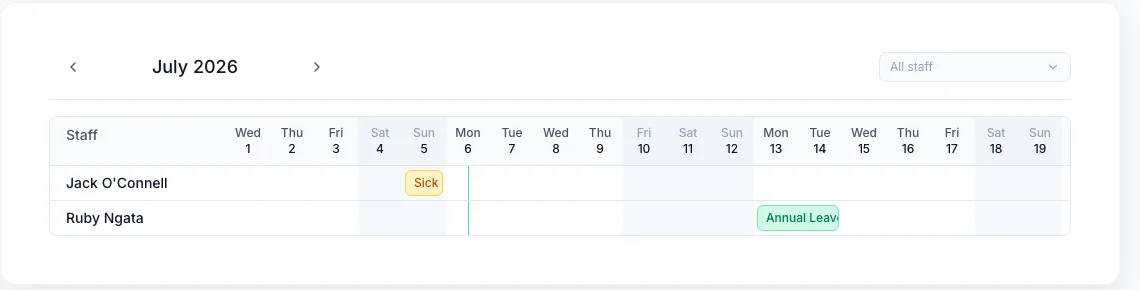
New requests reach owners and admins by email, or by WhatsApp with Approve and Decline buttons if you turn that on. Every pending request sits beside the month calendar, so you can see who else is away before you decide. Decline with a reason, and the staff member is told by email, and by WhatsApp or text message if you choose.
- Approve, decline or edit, at any stage
- Add leave on someone’s behalf when they ask in person
- Approved leave shades the roster grid straight away
Three
Approved leave reaches payroll
With Xero Payroll connected, approved leave is created, updated or deleted in Xero on the next leave sync, and each entry shows whether it is pending, synced or failed and why. With Crystal Payroll it goes in the leave export. For iPayroll, Smartly, PaySauce, MYOB IMS and SmoothPay it is written into the same timesheet file as the hours.
Clockie keeps the record and passes it on. Entitlements, balances and holiday pay stay with your payroll, which is where Employment New Zealand’s public holiday dates are applied to pay. Our free public holiday planner lists the same dates with the regional anniversary days.
This is general information, not legal advice. For specific situations, talk to an employment law specialist or your advisor.
Leave, tied to the hours people really work
Requests from the kiosk
Staff enter their PIN on the shared tablet, choose Leave, and pick the dates, the leave type and the units. No app and no login.
Or from their own phone
Staff with a personal clock page request leave from the same screen they clock in on, and see whether it is pending, approved or declined.
Approvals in one queue
Owners and admins approve or decline each request, with a reason when they decline. Admins can also add leave on a staff member’s behalf, or edit it later.
Everyone is told
New requests go to owners and admins by email, and by WhatsApp with Approve and Decline buttons if you turn that on. Staff get the decision by email, and by WhatsApp or text if you choose.
A month calendar
Who is away and when, as bars across a month. Weekends and NZ public holidays are shaded, including each person’s own regional anniversary day.
Already on the roster
Approved leave shades the roster grid, so you see who is away before you give them a shift.
Pushed to Xero or Crystal
Approved leave can be created, updated and deleted in Xero Payroll, or sent in the Crystal Payroll leave export. Balances are read from your payroll and shown in Clockie, never worked out by it.
In the payroll file
Approved leave is written into the timesheet export for iPayroll, Smartly, PaySauce, MYOB IMS and SmoothPay, using the leave code you map once.
A record you can stand behind
Every request keeps its dates, units, leave type, who reviewed it and when, and the reason for a decline. It sits beside the hours the same person actually worked.
Eleven national days, plus the right anniversary day for each person
Set the regional anniversary day on each location and it becomes the default for the staff who work there. A staff member who works across regions, or who has agreed a different day, gets their own. The leave calendar shades it, the roster marks it, leave requests skip it when counting days, and the Rostered vs Actual report shows it in its public holiday column. Dates are covered for 2024 to 2031, with Mondayisation applied.
Included, not an add-on
$29per month NZD + GST, leave included
- 5 staff
- then $2 each a month
- 1 location
- then $10 each a month
- 25 SMS
- a month, then 10c each
- always free
20 staff on one site: $59 a month
What it does not do
Clockie does not calculate leave entitlements, accrue balances or work out holiday pay. Your payroll does that, and Clockie shows its balances read-only where the payroll provides them. It is not an HR system: there are no contracts, policies or performance reviews. If those are the reason you are buying, a payroll or HR platform will suit you better, and our comparisons say so.
Compare Clockie with Employment Hero, PayHero and Tanda.
Leave, answered
Is leave management included in the Clockie price?
Yes. Leave requests, approvals, the leave calendar and the payroll sync are part of the $29 NZD a month plan, plus GST, for every business that uses the staff time clock. There is no per-user leave fee and no higher tier. You turn leave requests on when you are ready and choose the leave types you offer.
How do staff ask for leave?
At the kiosk, after entering their PIN, they choose Leave and enter the dates, the leave type and the units, including a half day or a custom number of hours for a single day. Staff with a personal clock page do the same from their own phone. Either way the request waits for an owner or admin, and staff can never approve their own leave.
Does Clockie know about NZ public holidays?
Yes. The leave calendar and the roster mark the 11 national public holidays, on the Mondayised date when one falls on a weekend, plus each location’s regional anniversary day once you set it. A staff member who works across regions can have their own day set instead. Public holidays are skipped when Clockie counts the days in a leave request, and dates are covered for 2024 to 2031.
Does Clockie work out holiday pay or leave balances?
No. Clockie keeps the leave record and sends approved leave to your payroll. Your payroll provider calculates entitlements and holiday pay. Where your payroll makes balances available, such as Xero or Crystal Payroll, Clockie shows them read-only to admins and to the staff member on their own page.
How does leave reach Xero?
You choose whether Clockie pushes leave to Xero Payroll or you enter it in Xero yourself. In push mode, an approved request is created in Xero, an edit updates it and a deletion removes it on the next leave sync. Each entry shows its sync status, and the units must match the Xero leave type, so a type set up in days takes days rather than hours.
What if we do not use Xero or Crystal?
For iPayroll, Smartly, PaySauce, MYOB IMS and SmoothPay, approved leave is written into the same timesheet file as the hours, using the leave codes you map. For PayHero, Employment Hero, Thankyou Payroll and the generic CSV, the file carries worked time only and you enter leave in payroll from the Clockie record.
Guides and related pages
Plain, sourced guides to leave and public holidays in New Zealand, and the parts of Clockie that leave connects to.
Leave requests where your staff already clock in
Start a 14-day free trial. No credit card. Leave management is included.