
Visitor sign-in that runs on the kiosk you already have
Give visitors and contractors a professional sign-in experience — site inductions, host notifications, and evacuation muster — without buying new hardware or paying for a separate system.
$10 / additional location / month • Free during your 14-day trial • All prices exclude GST
$0
New hardware needed
2 min
Setup per location
12 mo
Default record retention
Included
first location, then $10/extra
Everything included
Complete visitor management
Everything you need to professionally sign in visitors and contractors — built into Clockie, so there’s no standalone visitor system to pay for on top of your time tracking.
Runs on your existing kiosk
No new hardware. Clockie's visitor sign-in runs on the same iPad or tablet your team already clocks in on. Flip a toggle and visitors have their own branded welcome screen.
Site inductions & custom questions
Walk visitors through your site safety information before they sign in. Add custom questions, hazard acknowledgements, and collect a digital signature — all on the kiosk.
Instant host notifications
When a visitor signs in, their host gets an email or SMS straight away. No more reception calls or missed arrivals. Hosts can also trigger a resend if needed.
Evacuation muster roll-call
In an emergency, trigger an evacuation from the admin dashboard. Clockie takes an instant snapshot of everyone on site and broadcasts SMS alerts so you can account for every visitor.
Visitor & contractor directory
Every visitor builds a record over time — name, company, contact details, previous visits, induction status. Great for contractors who come back regularly.
Sign-in records & CSV export
A full searchable history of every sign-in, with filters by date, site, and visitor type. Export to CSV for your own records or to share with a H&S auditor.
How it works
From walk-in to record kept — under two minutes per visitor.
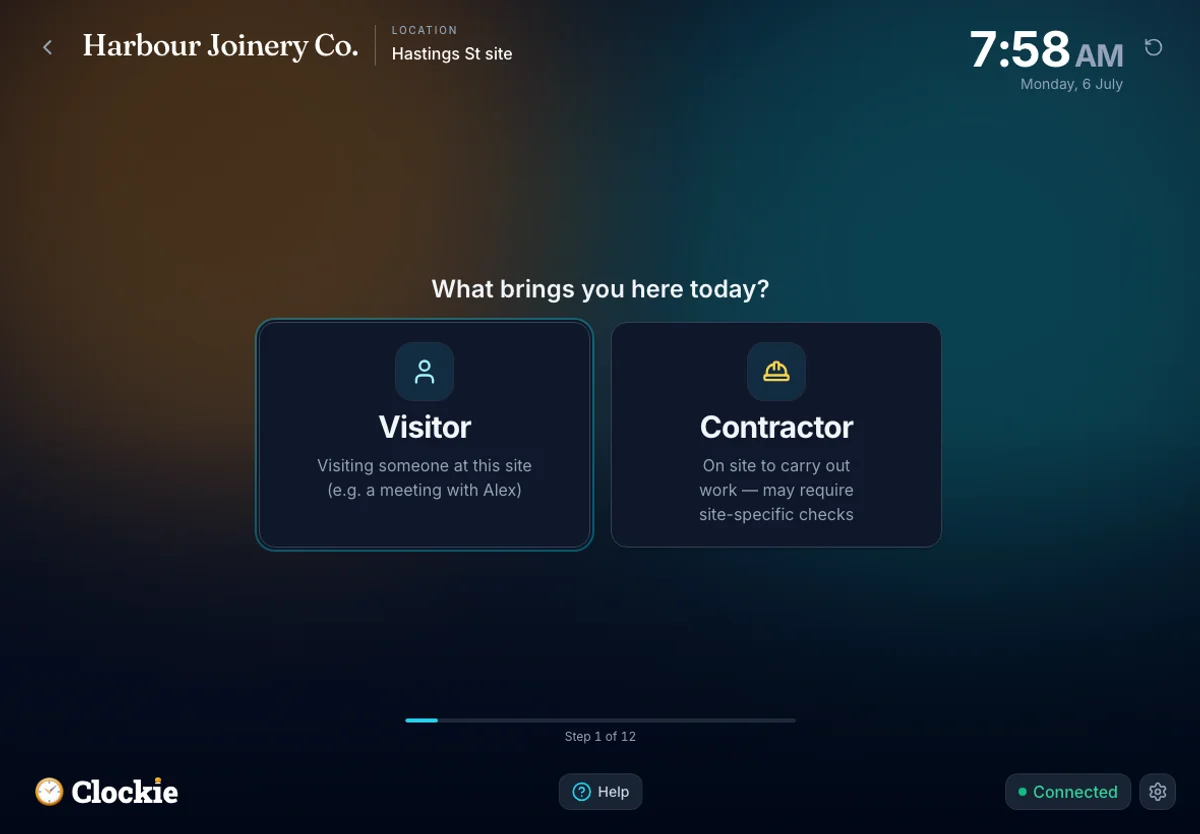
Visitor walks up to the kiosk
They tap "Visitor" on the existing kiosk screen — no separate device needed.
Induction & sign-in
The wizard walks them through site safety info, custom questions, and a digital signature.
Host gets notified instantly
An email or SMS goes straight to the person they're meeting. No reception required.
Record kept automatically
Admin has a full audit trail — who was on site, when, and what they acknowledged.
See it in action
The real screens, start to finish
From the moment a visitor taps in to accounting for everyone in an evacuation — these are actual Clockie screens, not mock-ups.
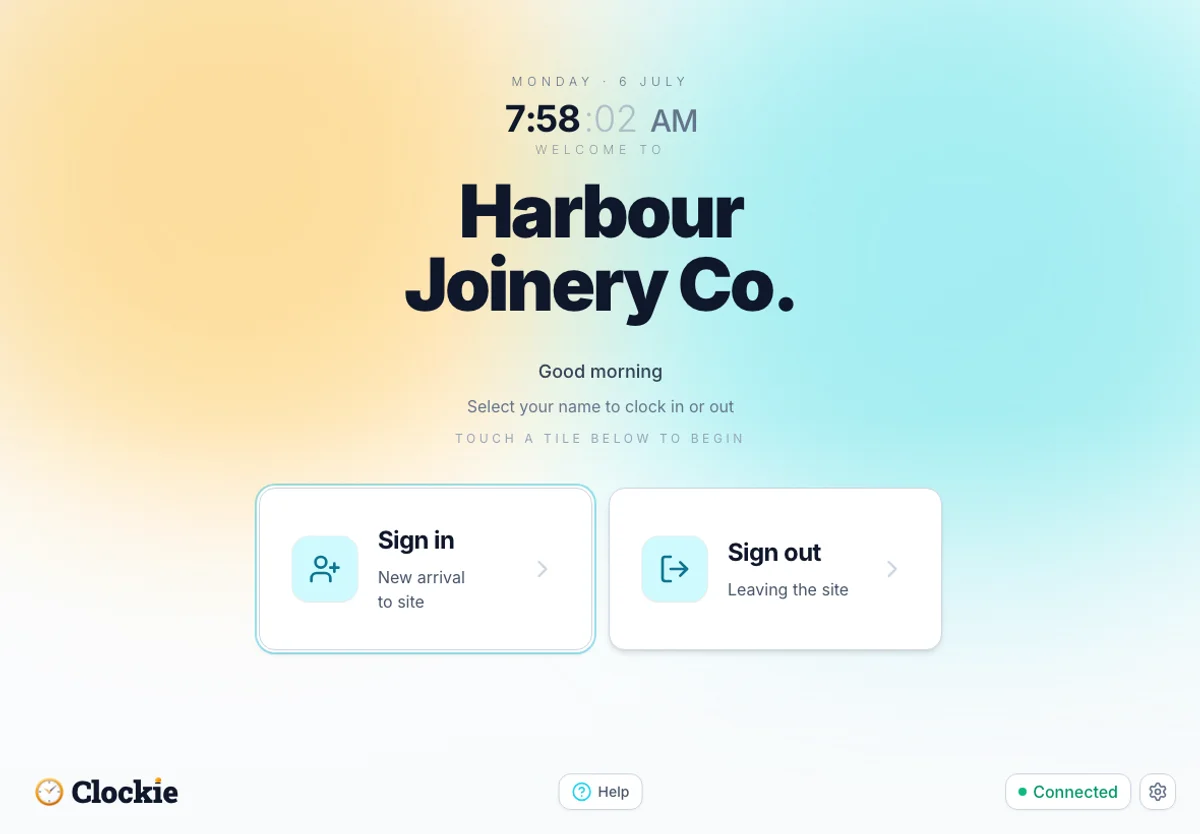
A branded welcome screen
The same tablet greets visitors with your business name and a simple sign-in / sign-out choice.
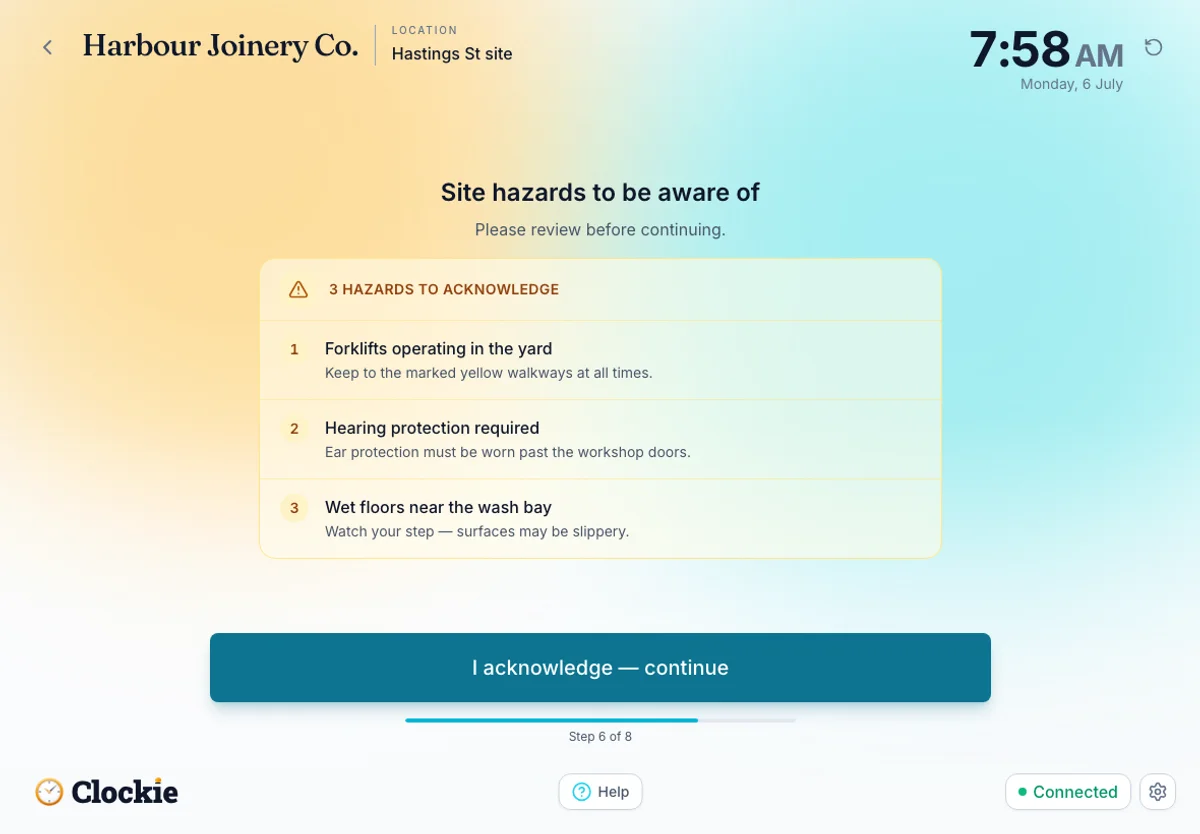
Hazard acknowledgement
Visitors review your site hazards and acknowledge them before they can continue.
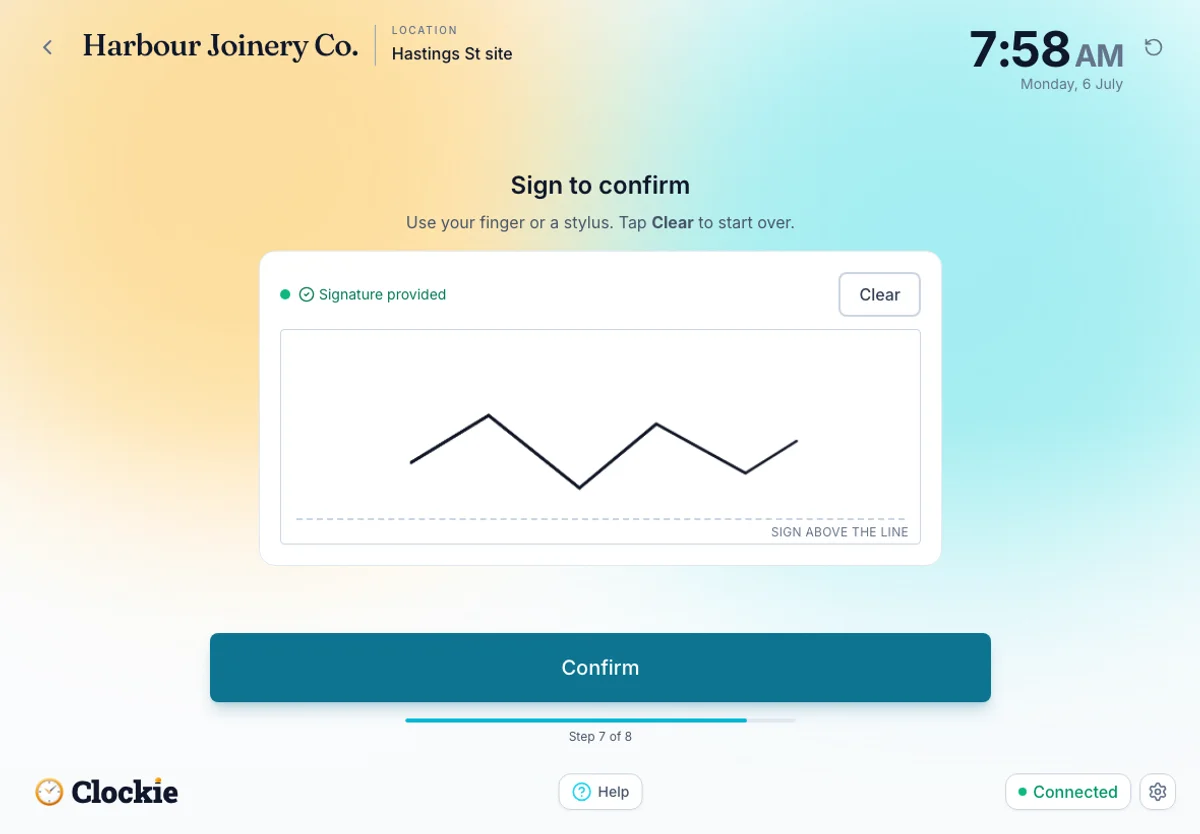
Digital signing
Capture a signature right on the tablet to confirm the induction — no paper to file.
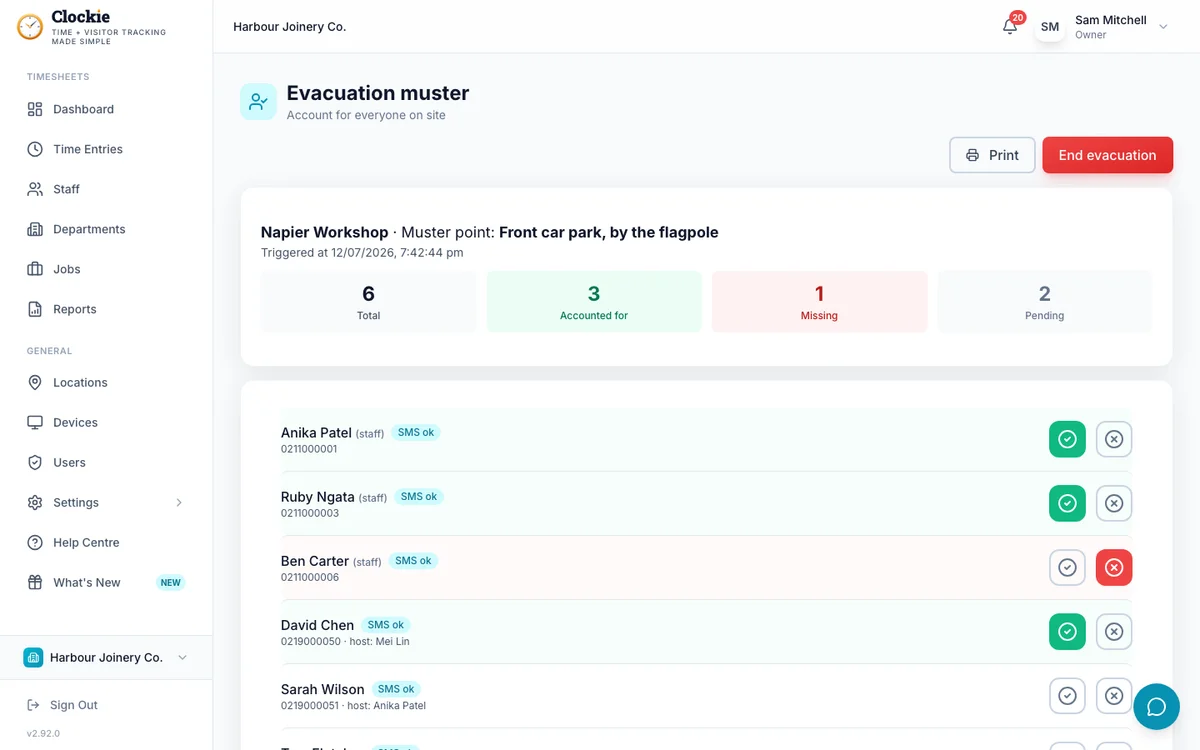
Evacuation muster
Trigger an evacuation and account for every person on site — staff and visitors — in real time.
Built for NZ workplaces
Supports your H&S record-keeping
Knowing who’s on site — and what they acknowledged before entering — is good practice for any NZ business. Clockie helps you keep that record without extra admin:
- Sign-in records retained for 12 months by default (configurable)
- Digital signature and induction acknowledgement captured at sign-in
- Evacuation muster shows exactly who was on site at the time of an incident
- CSV export for your own records or to share with an auditor
- Per-location zones and induction content — customise per location
Clockie supports your record-keeping practices. It does not guarantee compliance with any specific WorkSafe NZ requirements — check with your H&S advisor for your obligations.
Works for
- Construction & trades
- Manufacturing & warehousing
- Healthcare & aged care
- Education
- Corporate offices
- Hospitality venues
Any NZ business that receives visitors, contractors, or delivery personnel on site.
Already on Clockie?
Add visitor sign-in in about two minutes
If your team is already clocking in on Clockie, visitor sign-in is one toggle away — and it’s included. No new hardware. No new login. The same kiosk switches between staff and visitor mode automatically.
Enable visitor mode
Turn on Visitor Management in your settings. Your kiosk gets a visitor welcome screen.
Set up induction content
Add your site hazards, any custom questions, and choose who gets notified when visitors arrive.
You're done
Visitors sign in on the same device. Records are kept automatically. Nothing else to install.
Simple, included pricing
Your first location is included • excl. GST
Visitor sign-in comes with your Clockie plan, and your $29 base covers your first location. Running three sites? That’s two additional locations at $10/month — $20 on top of your base plan. No per-visitor charges, no seat limits.
How visitor pricing works
Clockie pricing in NZD, excl. GST.
No credit card required • Cancel anytime • All prices exclude GST
Common questions
Do I need a separate kiosk for visitor sign-in?
No. Visitor sign-in runs on your existing Clockie kiosk. The same iPad or tablet can handle staff clock-ins and visitor sign-ins — it detects which flow to show automatically. If you want a dedicated visitor-only kiosk, you can do that too with a second device.
What does the visitor induction include?
You decide. You can add site hazard notices, safety rules, custom questions (e.g. "are you carrying any hazardous materials?"), and a mandatory digital signature. Induction content is configured per location and can be published or unpublished independently.
How does the evacuation muster work?
When you trigger an evacuation from the admin dashboard, Clockie takes an instant snapshot of everyone currently signed in across the site. You get a muster roll-call you can work through, and an SMS broadcast goes to all visitors on site so they know to evacuate. You can mark people as accounted for in real time.
How long are sign-in records kept?
By default, Clockie retains visitor sign-in records for 12 months. You can adjust this in your settings if your requirements differ. Records include who signed in, when, what they acknowledged, and any answers to custom questions.
What if I only want visitor sign-in, not the time tracking?
That works — Clockie has a visitor-only mode that hides the staff time-tracking surfaces and focuses the app on visitor sign-in. You still pay the standard $29 plan (which includes your first location), then $10/month per additional location. Email hello@clockie.nz and we'll set you up.
Is there a limit on visitor numbers?
No. Your plan covers unlimited visitors. Locations beyond your first are billed at $10/month each — you're only billed per location, never per visitor.
Does it work offline?
Yes. If your kiosk loses internet, visitor sign-ins are queued locally and sync automatically when connectivity is restored. The visitor gets a complete sign-in experience either way.
Ready to sort your visitor sign-in?
Start your free 14-day trial. Visitor sign-in is included at no charge during the trial — no credit card required.
Questions? Email hello@clockie.nz — we usually reply the same business day (Mon–Fri, NZ time).