
The site induction happens at sign-in, on the tablet by the door.
A contractor taps in, reads your hazards, answers your questions and signs. An answer that should worry you stops the flow and tells the host. Someone who was here last week is not asked twice. Included in the $29 a month NZD plan, plus GST.
14-day free trial. No credit card. Cancel anytime.
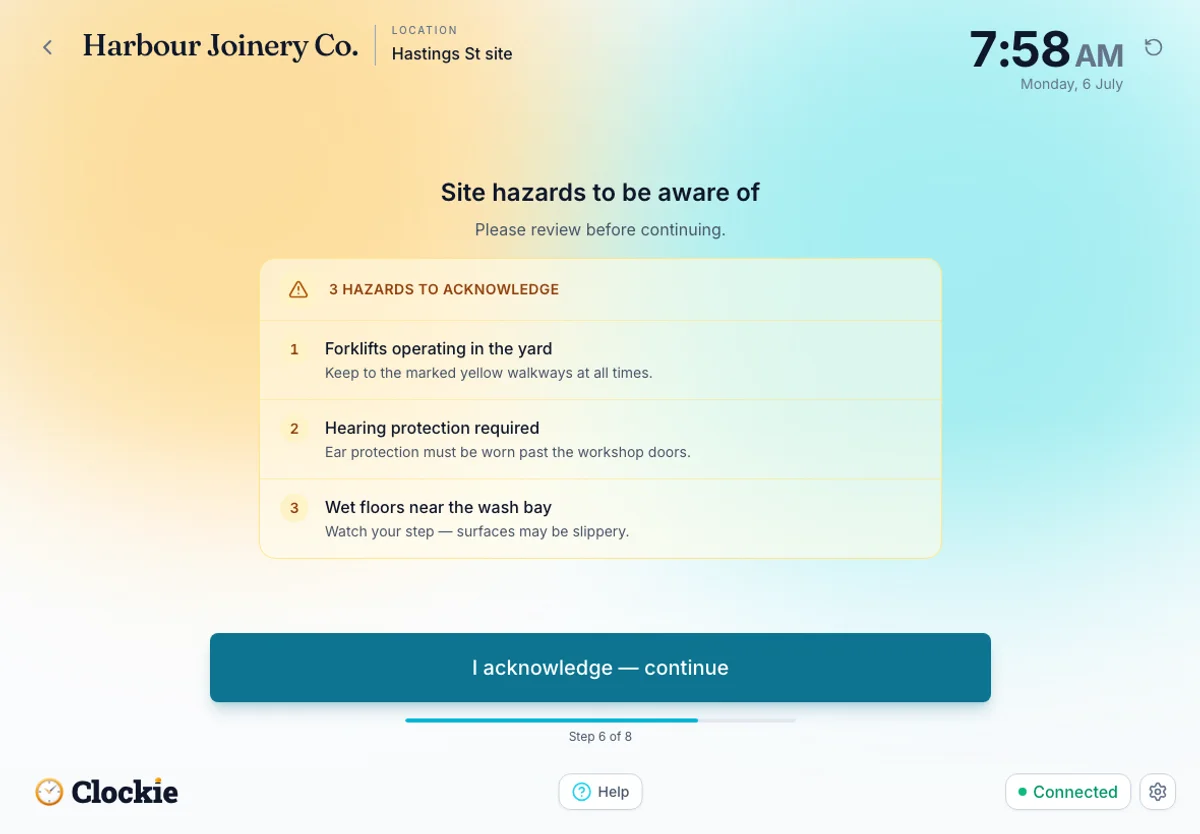
Hazards, acknowledged
The contractor reads each hazard and confirms before the wizard moves on.
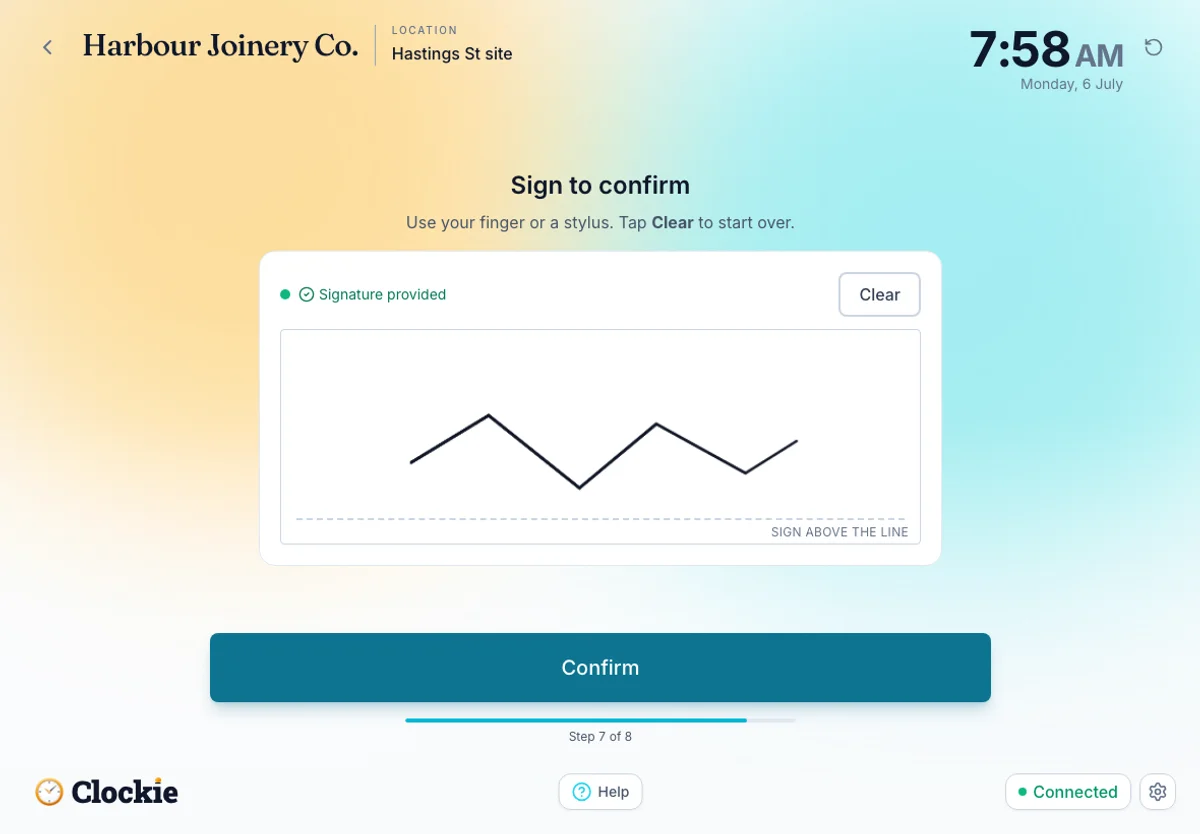
Signed on the tablet
A signature or a photo confirms the induction and is stored with the visit.
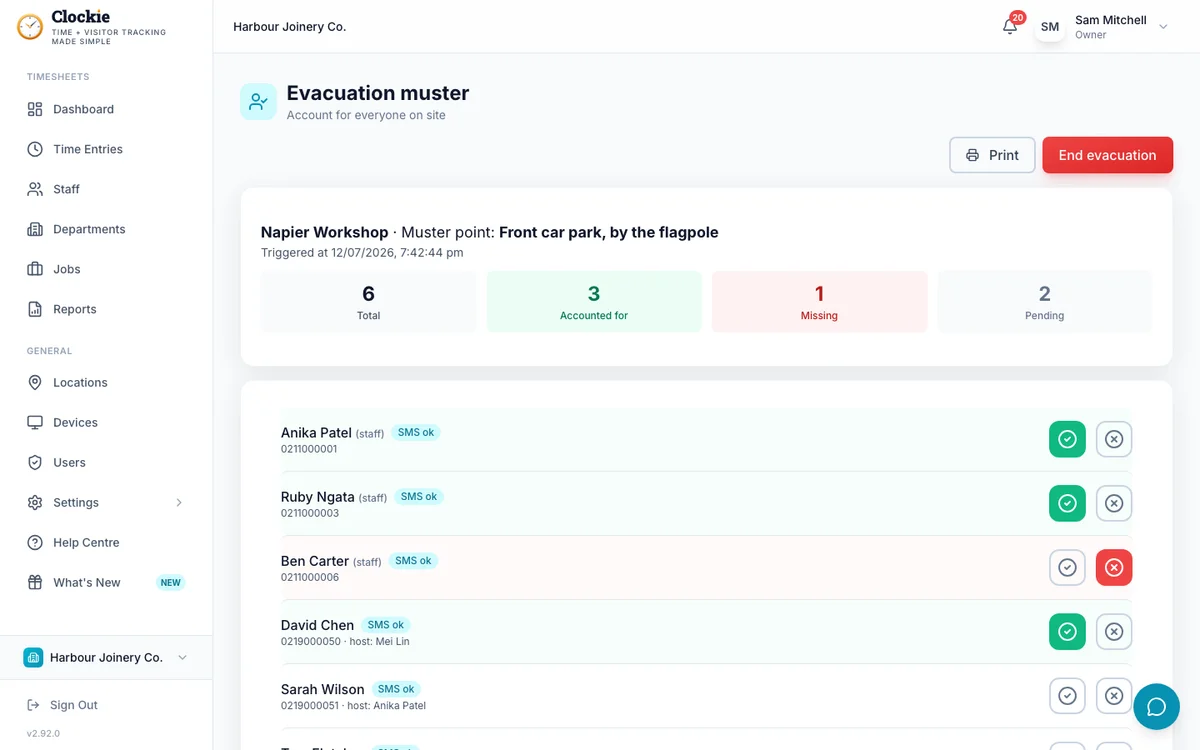
Counted in the muster
Contractors, visitors and staff on one roll call, marked accounted for as they arrive.
Three things a sign-in book cannot do
One
Induct at the point of entry
The induction is built per location from the sections you choose: info cards, hazards, your evacuation plan, questions and acknowledgements. The contractor works through it on the kiosk before the sign-in completes, so the induction is done where the risk is, not emailed a week before and forgotten.
- Different content for visitors, contractors and deliveries
- Zone-tagged sections for the parts of the site they will enter
- A signature or photo to close it off, if you want one
Two
An adverse answer stops the flow
Ask “Are you bringing hazardous substances on site?” or “Have you worked at heights in the last 12 months?” and mark the answers that matter. A contractor who gives one sees your warning on the review step and must acknowledge it before they can finish. The host alert carries the flagged answer, and the visit is badged Flagged in your records.
- Works on yes or no and multi-select questions
- Acknowledgement time stored on the visit
- A soft gate: it alerts and records, it does not lock a door
Three
Returning contractors are remembered
A contractor who has been before is recognised from their phone number and skips the induction while it is still current. Bump the induction version after a change, set a refresher period on the location, or tag content to a zone they have not entered, and they see it again. Every visit records which version they acknowledged and when.
For what the law expects of you when contractors work on your site, start with WorkSafe’s guidance on working with other businesses. Clockie keeps the record of what each person was shown and acknowledged.
This is general information, not legal advice. For your own health and safety obligations, talk to WorkSafe or your advisor.
Contractor sign-in, built into the kiosk
Runs on the kiosk you already have
Contractors tap the visitor button on the same tablet your staff clock in on, or on a tablet set aside for sign-in. Nothing to buy and nothing to install.
Induction content per site
Build each location’s induction from info cards, hazards, your evacuation plan, questions and acknowledgements. Reorder them by dragging. Publish or unpublish it without touching the other sites.
Hazards acknowledged one by one
Each hazard shows its title and detail. The contractor confirms they have read the list before the wizard moves on, and that acknowledgement is stored on the visit.
Adverse answers stop the flow
Mark the answers that matter on a yes or no or multi-select question, and write the warning. A contractor who gives one must acknowledge it before they can finish, the host is told, and the visit is badged Flagged.
Signature or photo, your choice
Choose a signature, a photo, both or neither per location. The signature confirms the induction and sits on the record, with no paper to file.
Zones within a site
Tag induction sections to zones, such as the yard or the plant room. A contractor who picks a zone they have not been inducted into sees that zone’s content, and nothing they have already covered.
The host knows they are here
The person they are visiting gets an email or a text message the moment a contractor signs in, including any flagged answer, so nobody waits at the door.
Works when the internet does not
Sign-ins queue on the tablet and sync when the connection returns. The contractor gets the full induction either way.
One muster, everyone on site
Start an evacuation and the roll call lists clocked-in staff, visitors and contractors together, with a text message to each one that carries the assembly point.
Who was on site, when, and what they acknowledged
Sign-in Records keeps every visit: name, company, contact details, arrival and departure, the induction version acknowledged, the signature or photo, and any flagged answer. Search it, filter it by date, site and visitor type, and export it to CSV for your own files or an auditor. Records are kept for 12 months by default, and you choose the retention that suits you.
Included, per site
$29per month NZD + GST, first location included
- Extra locations
- $10 each per month
- Contractors and visitors
- unlimited, never charged per person
- 25 SMS
- a month for host alerts and musters, then 10c each
- always free
What it does not do
Clockie does not store contractor licences or certificates, chase expiring documents, or pre-register visitors before they arrive. It does not print badges and it does not control doors or gates. The induction is text and simple formatting, not video. If those are the reason you are buying, a dedicated contractor-management platform will suit you better, and our comparison says so.
Compare Clockie with Sign In App and SwipedOn.
Contractor induction, answered
What can a contractor induction include?
Whatever your site needs. Per location you can add info cards, hazards, your evacuation plan, questions with a text, yes or no, multi-select or must-tick answer, and acknowledgements the contractor must read before continuing. Content is written in plain text with simple formatting, and you can tag sections to zones so a contractor only sees what applies to where they are going.
How does adverse-answer gating work?
On any yes or no or multi-select question, mark the answers that should raise a flag and write the warning to show. When a contractor gives one of those answers, the review step shows your warning and they must acknowledge it before the sign-in completes. The flag is stored with the time they acknowledged it, the host alert includes the flagged answer, and the visit shows a Flagged badge in Sign-in Records. It is a soft gate: it records and alerts, it does not physically bar anyone.
Do returning contractors repeat the induction every time?
No. Clockie recognises a returning contractor from their phone number and skips the induction while it is still current. It is shown again when you bump the induction version, when the refresher period you set on the location has passed, or when they pick a zone they have not been inducted into. The record keeps which induction version each person acknowledged and when.
What record is kept?
Each visit stores who signed in, their company and contact details, when they arrived and left, which induction version they acknowledged, their signature or photo if you collect one, and any flagged answer. Sign-in Records is searchable and filterable by date, site and visitor type, and exports to CSV. Records are kept for 12 months by default, and you can change that in your settings.
Are contractors included in the evacuation muster?
Yes. An evacuation freezes a snapshot of everyone on site at that moment: contractors and visitors who have signed in, plus clocked-in staff. Each person with a mobile number gets a text message with the assembly point, and you mark people accounted for on the live list from any phone. See the evacuation roll call page for how a drill differs from a real event.
What does it cost?
Contractor and visitor sign-in is part of the $29 NZD a month plan, plus GST, which covers your first location. Each additional location is $10 a month. There is no charge per visitor or per contractor, and no charge per induction. A business that only wants sign-in, without the staff time clock, can run Clockie in visitor-only mode on the same plan.
Related pages
The rest of the visitor product, and the staff time clock it shares a tablet with.
Induct every contractor at the door
Start a 14-day free trial. No credit card. Contractor sign-in is included.