
One tap. Everyone on site. Accounted for.
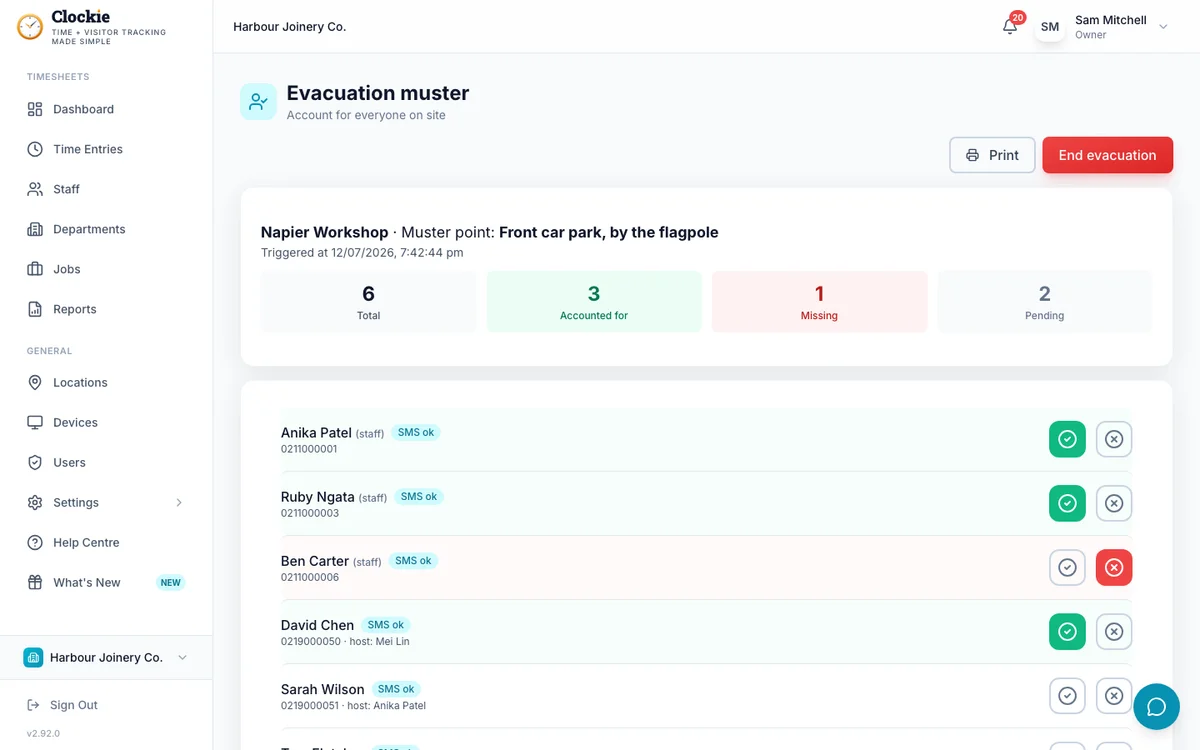
When the alarm goes, Clockie freezes a list of everyone on site, texts each of them the assembly point, and gives you a live roll call on your phone. Staff, visitors and contractors on one list, because they all signed in on one tablet. Included in the $29 a month NZD plan, plus GST.
14-day free trial. No credit card. Cancel anytime.
Three things a clipboard at the assembly point cannot do
One
Know who is actually here
The list is not a staff directory. It is the people clocked in or signed in at that site at the moment you tap Start evacuation: staff from the time clock, visitors and contractors from the sign-in kiosk. Clockie freezes that snapshot so the list cannot change under you while you are counting heads.
- Staff, visitors and contractors on one list, each labelled
- Nobody is signed out, so the roster is still right afterwards
- Staff with no site recorded are counted separately, never dropped
Two
Reach them by text, not by shouting
Every person on the snapshot with a mobile number gets one text message naming the site and the assembly point you set for it. A visitor who is in a meeting room with the door shut, or a contractor on the far side of the yard, reads it on their own phone. You see on the list whether each message was sent, failed or skipped.
- Visitors and contractors always; staff when you turn it on
- One message per person, with the status shown beside their name
- If sending fails outright, owners and admins get an email
Three
Drill it the same way you would use it
Choose Training drill instead of Live evacuation and everything runs the same, except that the page says so, the text message starts with DRILL and says there is no real emergency, and the audit log records a drill rather than an event. Your wardens practise on the real tool, and the people on site know it is practice.
Whether your building needs an approved evacuation scheme, and how often to run trial evacuations, is set out by Fire and Emergency New Zealand. Clockie gives you the roll call and the record of each drill.
This is general information, not legal advice. For your own evacuation scheme obligations, talk to Fire and Emergency New Zealand or your advisor.
A muster built on the sign-ins you already have
One tap to start
From Who’s Here or the dashboard, pick the site, choose Live evacuation or Training drill, and confirm. The muster list is on screen straight away.
A frozen snapshot
The list is everyone clocked in or signed in at that moment. Nobody is signed out, so the roster is still right afterwards and nobody has to sign back in.
A text to every person on site
Each person with a mobile number gets one message naming the site and the assembly point. Visitors and contractors always; staff too when you turn that on.
Marked off as they arrive
Tap Accounted for beside each name from any phone or tablet at the assembly point. The counts of accounted for, missing and not yet marked update as you go.
Delivery shown per person
Beside each name you see whether their text was sent, failed or skipped because there was no number, so you know who still needs a shout.
Runs on the phone in your pocket
The muster page is part of the admin app, so it works on the phone you carry out of the building, not only the tablet left inside it.
Print it
A print button gives emergency services a clean paper list of names and status if they ask for one.
Drills kept apart from real events
A drill is marked as training on screen and its texts start with DRILL. Starting and ending either one is written to your audit log with the final count.
Tell your other systems
Webhooks fire when an evacuation starts and when it ends, so a dashboard or alerting tool elsewhere can react.
Three settings, once per site
Set the assembly point on the location’s evacuation plan so the text message names it. Set an auto sign-out time so visitors who forget to sign out drop off the roster. Decide whether staff get the text as well as visitors. Then bookmark Who’s Here on your phone, because that is where the Start evacuation button lives.
Included, per site
$29per month NZD + GST, first location included
- Extra locations
- $10 each per month
- People on site
- unlimited, never charged per person
- 25 SMS
- a month for musters and host alerts, then 10c each
- always free
What it does not do
Clockie can only count people who signed in or clocked in. It does not sound the alarm, talk to your fire panel, or send push notifications through a staff app; the message is a text to the mobile number on file, and someone with no number is listed but not texted. It does not replace your building’s evacuation scheme or your wardens. If you need pre-registration, badge printing or integration with access control, a dedicated visitor platform will suit you better, and our comparison says so.
Compare Clockie with Sign In App and SwipedOn.
Evacuation roll call, answered
Who is on the muster list?
Everyone on site at the moment you start the evacuation: visitors and contractors who signed in on the kiosk, plus staff clocked in at that location. Each name shows whether it is a staff member or a visitor. Staff who clocked in without a location recorded cannot be placed on a site, so the page tells you how many of those there are rather than leaving them out silently.
How does the text message work?
When you start the evacuation, Clockie sends one text to every person on the snapshot who has a mobile number, naming the site and the assembly point you set for that location. Visitors and contractors are always included, and staff are included when you turn on staff notifications. The message for a drill starts with DRILL and says it is a practice. If the messages cannot be sent at all, the owners and admins get an email so they can tell people in person.
What does a text message cost?
Evacuation texts use the SMS included in your plan: 25 a month, then 10c each. A real evacuation or a drill at a site with 30 people on it is 30 messages. Email is always free.
Can we run a drill without alarming people?
Yes. Choose Training drill when you start. The muster page shows a training banner, the text message starts with DRILL and says it is a practice with no real emergency, and the audit log records it as a drill. Everything else, including marking people accounted for, works exactly as it does in a real evacuation.
What keeps the list accurate?
The list is only as good as the sign-ins and clock-ins behind it. Set an auto sign-out time on each location so visitors who forget to sign out drop off the roster, keep the kiosk near the door, and make sure staff clock in at the site they are working at. An evacuation never signs anyone out, so the Who’s Here roster is still correct once everyone is back inside.
What does it cost?
The evacuation roll call is part of the $29 NZD a month plan, plus GST, which covers your first location. Each additional location is $10 a month, and there is no charge per person or per evacuation. It needs visitor sign-in or the staff time clock, or both, to have someone to count.
Related pages
The sign-in and time clock features that feed the muster list.
Put the roll call on your phone
Start a 14-day free trial. No credit card. The evacuation roll call is included.