
Approved hours, sent live to Crystal Payroll
Connect Clockie to Crystal Payroll once and send each pay period with a click. Timesheets, leave and cost centres travel over Crystal’s API — no CSV files to build, upload or fix.

Crystal Payroll
Receives approved hours straight across the connection.
- Employee mapping
- Two-way between the two systems
- Sends
- Approved time entries and leave
- Preview
- Dry run before anything is sent
- Fallback
- Formatted CSV export also available
How it works
From clock-in to pay run in four steps — the hours do the walking.
Connect Crystal once
Authorise Clockie from Settings, then Integrations. Clockie stores the connection securely and checks which Crystal capabilities your company has enabled.
Match your people
Clockie lists your Crystal employees and suggests matches to your staff by name and email. You confirm each mapping once and it sticks.
Approve the period
Review the pay period with NZ break deductions and rounding applied. Preview exactly what will be sent, employee by employee, before committing.
Send to Crystal
One click pushes the approved hours into Crystal. Clockie reads the timesheets back to confirm each row landed, and records the result in sync history.
How the hours reach Crystal
Approved hours in Clockie
Verified clock-ins with breaks, rounding and pay codes already applied.
Live connection
API
Crystal pay run
Receives approved hours straight across the connection.
Approved hours move straight across the connection into Crystal. Nothing to download, nothing to upload, nothing to re-key.
What the Crystal sync covers
The Crystal connection is a live API integration, not a file drop. Here is what moves, and what Clockie does to keep the two systems honest with each other.
- Connection type
- Authorised API connection per company, with tokens stored encrypted and refreshed automatically. No files to download or upload.
- What is sent
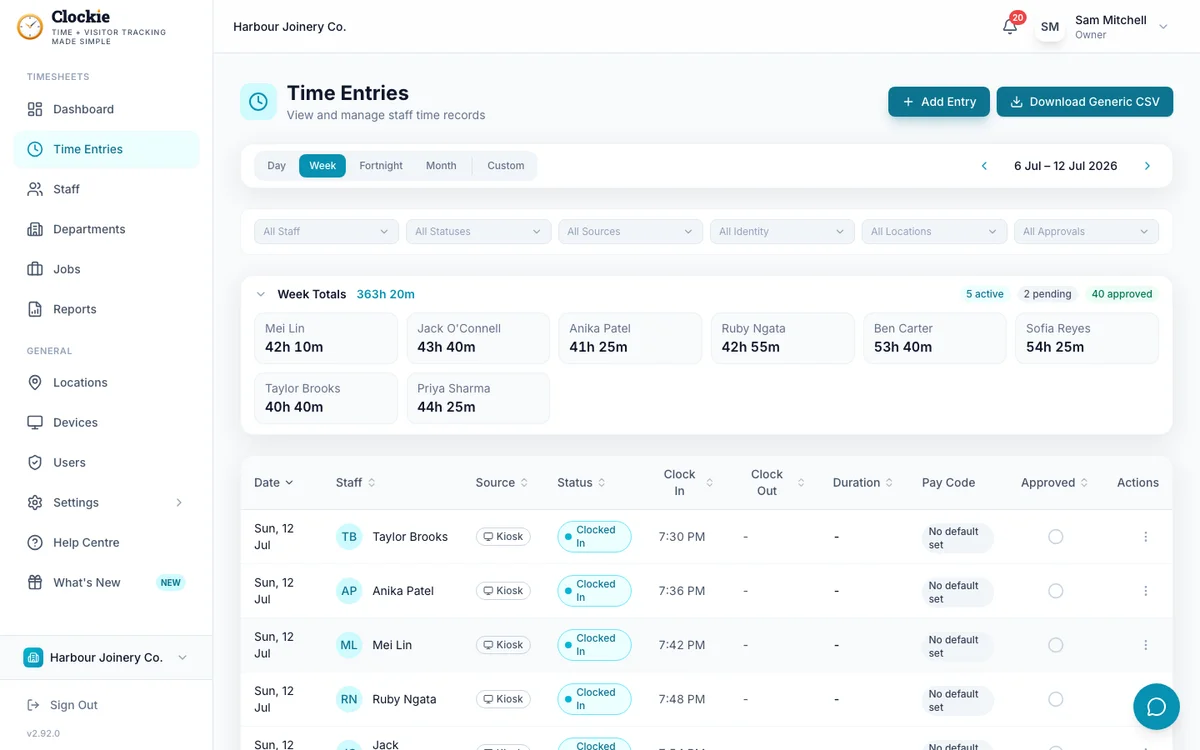
- One Crystal timesheet row per approved Clockie entry, carrying the action type, hours, date, start and end times and break minutes.
- Employee matching
- Confirmed staff-to-employee mappings, suggested automatically from names and emails and then confirmed by an admin.
- Pay codes
- A Clockie pay code’s export value becomes the Crystal action type, so ordinary time, overtime and allowances land on the right Crystal code.
- Leave
- Approved leave can be sent with the timesheet run, one row per leave day, using the leave pay code mapped in Clockie.
- Cost centres
- Department or job codes can be sent as the Crystal cost centre, chosen per business in the connection settings.
- Duplicate protection
- Every sent entry is recorded against its Crystal row, so re-running a period updates rather than duplicates, and a correction mode re-sends edited entries deliberately.
- Verification
- After sending, Clockie re-reads the period from Crystal and marks each entry synced only when a matching row comes back. Anything that fails is listed with the reason.
Why teams pair Clockie with Crystal
No files on pay day
Approved hours go from Clockie into Crystal directly. Nothing to export, nothing to upload, nothing to re-key if a shift changes at the last minute.
Every row confirmed, not assumed
Clockie reads the timesheets back from Crystal after sending and only marks entries synced when Crystal confirms them, so a silent failure cannot hide until pay day.
Leave and time in one run
Approved leave rides along with the timesheet push, so annual, sick and other leave arrive coded correctly instead of being keyed in separately.
Corrections stay clean
Edit an approved entry and re-send in correction mode: Clockie updates the row it created in Crystal rather than adding a second one.
About Crystal Payroll
Crystal Payroll is an independent Auckland-based cloud payroll provider operating since 2005, covering timesheets, leave management and IRD payday filing for New Zealand employers. It publishes an API that Clockie uses for the live timesheet and leave connection described here.
Crystal integration questions
Is the Crystal Payroll integration a real API sync?
Yes. Clockie connects to Crystal Payroll over an authorised API connection and pushes approved timesheets and leave directly into your Crystal company. A formatted CSV export is available as a fallback, but the API sync is the primary path.
How do I connect Clockie to Crystal Payroll?
In Clockie, open Settings, then Integrations, choose Crystal Payroll and authorise the connection with your Crystal company code. Then confirm the suggested staff-to-employee mappings, and you are ready to send your first period.
Can I see what will be sent before it goes?
Yes. Run a preview for the pay period and Clockie shows exactly which entries will be sent, grouped by employee, along with anything it will skip and why. Nothing reaches Crystal until you send.
What happens if I send the same period twice?
Clockie tracks every entry it has already sent, so a repeat run skips entries that are unchanged and already synced. If you have edited an entry, correction mode updates the existing Crystal row instead of creating a duplicate.
Are NZ breaks and rounding applied before syncing?
Yes. Your break-deduction and rounding rules are applied to the hours before they are sent, and only approved entries with a clock-out are eligible, so Crystal receives the hours you signed off.
Does the Crystal integration cost extra?
No. The Crystal Payroll sync is included in every Clockie plan, from $29 NZD per month excluding GST with five staff included, then $2 per extra staff member.
Clockie also syncs live to Xero Payroll, and writes formatted export files for the other New Zealand payroll systems. See all integrations.
Connect Clockie to Crystal Payroll
Try Clockie free for 14 days. No credit card. Verified clock-ins, automatic NZ breaks, and approved hours pushed straight into Crystal.
No credit card • Cancel anytime • NZ-based support